# How RECAP Organizes Data
RECAP separates definitions from instances and connects instances through a provenance graph. This organization lets one workflow definition be reused across many experiments while retaining the exact resources and parameters used by each run.
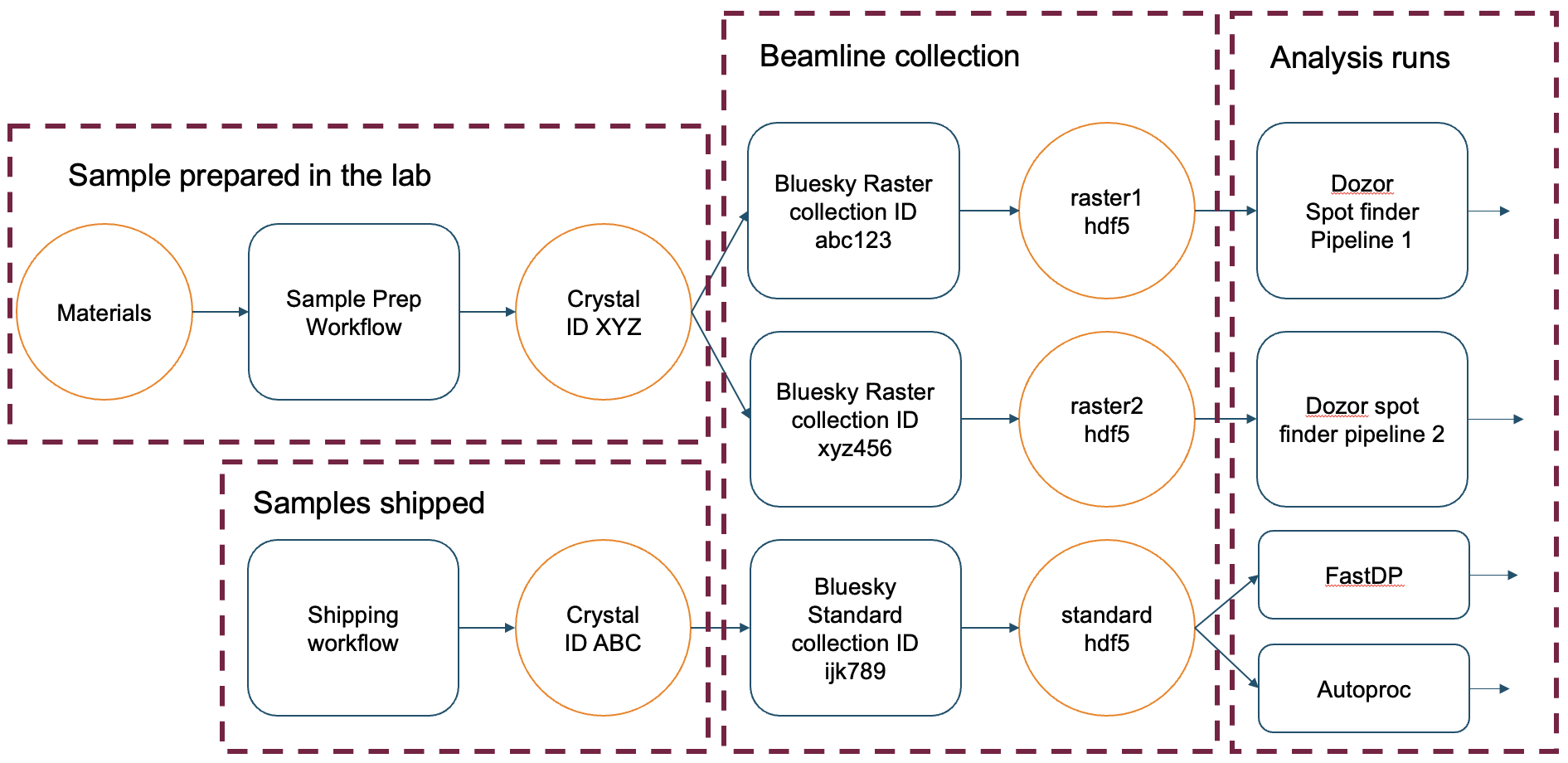
Resource and process provenance graph
The graph view is useful when a result must be traced back through the process runs and resources that produced it.
# Namespaces
Every process run, template, and resource belongs to a Namespace. Namespaces form a hierarchy such as:
``` text
beamline
└── beamline/amx
└── beamline/amx/proposal/312345
```
Namespace context scopes queries and writes. Namespaces also provide the boundary used by remote authorization. A child namespace can inherit visibility from ancestors without making sibling namespaces visible.
# Resources and resource templates
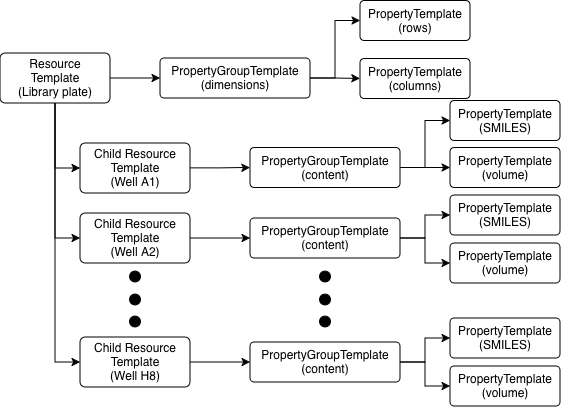
A Resource is any trackable physical, digital, or logical entity: a sample, a plate, a detector file, an instrument, or an intermediate dataset. A ResourceTemplate defines the structure that instances receive.
``` text
ResourceTemplate: Sample Plate
├── properties: dimensions
└── children: wells
├── A01
├── A02
└── ...
```
Child resources have their own identity, template, properties, and lifecycle within the parent graph. The public `children` value is a dictionary keyed by child name, so use `plate.children["A01"]` for named access and `plate.children.values()` for iteration.
Resource template organization
# Property groups and attributes
Resource and process templates organize values into named groups. Each attribute declares a value type, optional unit, default, and validation metadata.
``` text
dimensions
├── rows: int = 8
└── columns: int = 12
content
├── catalog_id: str
└── volume: float [uL]
```
Property values are exposed through typed schema models. A value has both a value and optional unit; metadata can constrain numeric ranges or enum choices.
# Process templates and runs
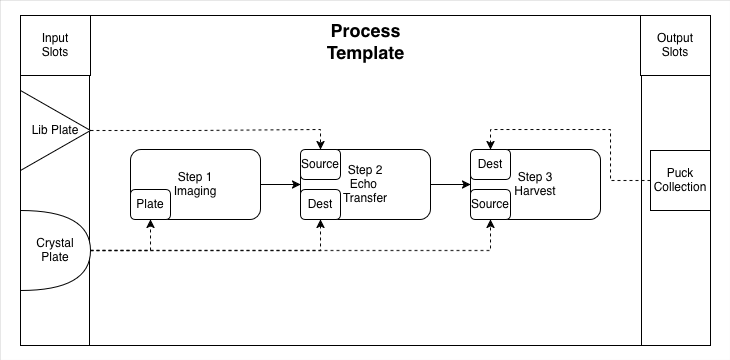
A ProcessTemplate is a reusable workflow definition. It contains ordered steps, step parameters, resource slots, and role bindings. A ProcessRun is one concrete execution of that template.
``` text
ProcessTemplate: Measure Sample v1.0
├── input slot: sample
├── output slot: result
└── steps
├── Collect
└── Analyze
ProcessRun: Run 001
├── sample -> Sample Plate 001
├── result -> Analysis File 001
└── parameters: values recorded for this run
```
Slots separate a workflow's interface from concrete resources. Steps bind slots to roles such as `source`, `destination`, or `operator`, so the same template can run with different resource instances.
# Provenance graph
Process runs connect resources into a directed provenance graph. A resource can be an input to one run, an output of another, or reused across multiple runs when namespace visibility and lifecycle rules permit it.
The provenance image above provides the detailed visual graph: for example, `Sample` can flow through a `Prepare` run to a `Prepared Sample`, then through a `Measure` run to a `Result File`. A resource may also be reused by another process run when namespace visibility and lifecycle rules permit it.
This graph supports questions such as which sample preparation produced a result file, which parameters governed a run, and which resources were assigned to a workflow step.